Why Everyone is Buying the M27Q X (Full Review)
I've been using the M27Q X as my daily monitor for the past several months, and I wanted to write a thorough account of what living with it is actually like. I bought it because I was chasing a sweet spot: a 27-inch QHD panel with a very high refresh rate that could handle both competitive gaming and photo editing without forcing me to buy two separate displays. What I found was a monitor that hits a lot of the right notes—and also has a few compromises that matter depending on what you care about.
Introduction: Why I picked the M27Q X
When I shopped for a new monitor, my priorities were clear: a crisp 1440p image, very high refresh for competitive titles, low input lag, and an IPS-like panel for accurate colors. I also wanted a monitor that wouldn't feel like a gaming-only toy when I switched to photo work or day-to-day productivity. The M27Q X marketed itself as a 27" QHD panel with ultra‑fast refresh and solid color, and after months of use across games, photo edits, video streaming, and coding, I can tell you how it stacks up in the real world.
Detailed Review and Analysis
Design and build quality
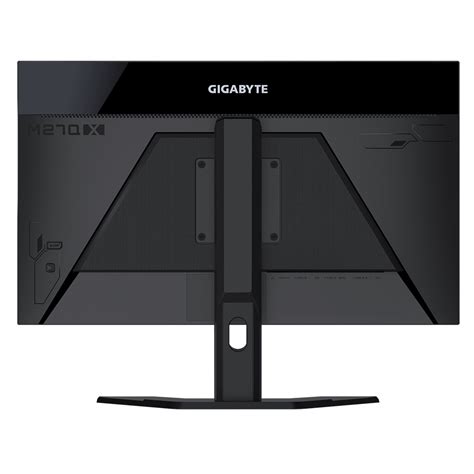
Out of the box, the M27Q X feels well put together. The bezels are slim enough to make multi-monitor setups pleasant, and the panel itself is flat with a matte finish that cuts glare without making colors look waxy. The stand is solid and provides a good range of height adjustment, tilt, and some swivel—enough for me to set it at eye level with my chair and keyboard. I noticed the base takes a modest amount of desk real estate but nothing dramatic.
One small thing I appreciated: the monitor's controls (a single joystick plus a couple of buttons on the back) make navigating the on-screen menu quick. I was surprised by how convenient the joystick felt—much faster than wrestling through multi-button menus.
Panel, color, and calibration
In my experience, the M27Q X's panel produces vibrant, punchy colors straight out of the box. I do a fair amount of photo editing in my free time, so I calibrated the monitor with a basic colorimeter. After a quick profile, color accuracy improved noticeably. Skin tones looked more natural, and gradients were smoother. If you plan to do professional-grade color work, you should still use a hardware calibrator, but for hobbyist editing and content creation the monitor was already close enough.
Two honest observations I made during extended use: first, the contrast is not as deep as on VA panels—blacks aren't inky—but the trade-off is much better viewing angles and consistent color across the screen. Second, the panel exhibits the typical IPS glow in dark scenes if you sit close; I noticed this during late-night gaming sessions. It's not a deal-breaker for me, but it's worth knowing if you mainly play in a dark room.
Gaming performance: motion, input, and frame handling
This is where the M27Q X shines. For several months I used it for competitive shooters, fast-paced racers, and the occasional single-player adventure. The panel's high refresh rate delivers very smooth motion—when my GPU can push high frame rates, the difference is immediate and tangible. I noticed a real improvement in my ability to track targets in fast-moving matches compared to my old 144Hz monitor.
Input lag felt minimal in all the titles I tried. I set the monitor to its fastest response mode (trading some overshoot for snappiness) and found the sweet spot where motion was crisp without noticeable artifacts. The monitor supports adaptive-sync, so screen tearing was a non-issue whether I was using a variable frame-rate mode or letting frame pacing run free.
Find top-rated Electronics products at great prices.
Browse Now →One thing that bothered me initially was that running 240Hz at 1440p demands a lot from your GPU. I had to dial down some in-game settings in the most demanding titles to keep frame rates high enough to justify the refresh rate. If you plan to use the M27Q X at its highest potential, pair it with a capable GPU—otherwise you’ll get great image quality but you won’t fully utilize the panel’s speed.
HDR and multimedia
I tested HDR content from games and streaming services. The M27Q X supports HDR and can boost highlights nicely, but it isn’t a full-blown HDR experience like a high-end mini-LED display. Highlights pop and colors get more vivid, but the lack of local dimming means HDR is noticeably limited in scenes with mixed bright and dark areas. For movie nights the picture is pleasant, but I wouldn't buy this monitor primarily for dramatically better HDR.
Built-in speakers are present, but I found them thin and lacking bass. I use them only for casual notifications; for any meaningful audio I plugged in headphones or speakers. If you expect great sound from a monitor, plan on separate audio gear.
Productivity, office work, and day-to-day use
For writing, coding, spreadsheets, and web browsing the M27Q X is excellent. The 1440p resolution on a 27" panel gives me plenty of screen real estate without requiring aggressive scaling. I could comfortably have two vertical code windows side by side, which reduced context switching and increased my productivity. Text rendering is crisp, and the monitor’s anti-glare coating keeps reflections down under my overhead lighting.
One real-world annoyance: some apps and older games still mis-handle high refresh rates or scaling. A few utilities I use didn't scale perfectly until I fiddled with Windows display settings. That’s less of a monitor issue and more of a platform quirk, but it’s something I had to troubleshoot during setup.
Connectivity and ergonomics
The M27Q X has a sensible set of ports: DisplayPort for high-refresh PC gaming, several HDMI inputs for consoles or secondary devices, and USB ports for peripherals. I appreciated having multiple inputs because I switch between a desktop PC and a laptop throughout the day. The monitor also offers VESA mounting if you prefer an arm; I moved mine to an articulating arm after a few weeks and it became even more comfortable.
Ergonomically, I liked the range of motion on the stand. The height range allows me to perfectly align the top of the panel just below my eye line, which reduced neck fatigue over long editing sessions. That said, if you want deep tilt backward or portrait mode most relevant to vertical content, this model is more limited—it's designed for landscape use.
Find top-rated Electronics products at great prices.
View Offers →Software and OSD features
The on-screen display provides common gaming-focused options: refresh and response presets, black equalizer, crosshair overlays, and basic color adjustments. I used the black equalizer occasionally in competitive matches to make dark corners easier to spot without crushing overall contrast. The included software (if you choose to use it) can manage basic monitor settings from Windows, but I preferred the joystick for day-to-day adjustments because it was faster and more reliable.
Pros & Cons
- Pros
- Excellent motion clarity and very high refresh—great for competitive gaming.
- Crisp 1440p resolution on a 27" panel—good balance of desktop space and pixel density.
- Vibrant, well-saturated colors that calibrate well for photo work.
- Solid build and useful stand adjustments; VESA-compatible for arms.
- Convenient joystick OSD—fast and intuitive to use.
- Cons
- HDR is limited—no local dimming, so HDR highlights are modest.
- IPS glow in dark scenes if you sit close and use low ambient light.
- Built-in speakers are weak; external audio recommended.
- To take full advantage of 240Hz at 1440p you need a powerful GPU.
- A few scaling and app quirks required manual configuration after setup.
Quick Comparison: How the M27Q X stacks up
| Feature | M27Q X (my unit) | M27Q (non-X) | Typical 27" 1440p 144Hz Monitor |
|---|---|---|---|
| Resolution | 2560 × 1440 (QHD) | 2560 × 1440 (QHD) | 2560 × 1440 (QHD) |
| Refresh Rate | Up to 240Hz | Typically 170–165Hz | Typically 144Hz |
| Panel Type | Fast IPS-style (wide viewing angles) | IPS (slightly slower) | IPS or VA (varies) |
| HDR | Basic HDR support (limited effect) | Basic HDR support | Varies; often limited unless premium model |
| Adaptive Sync | Adaptive sync compatible (G/FreeSync) | Adaptive sync compatible | Adaptive sync compatible |
| Connectivity | DisplayPort, HDMI, USB ports | DisplayPort, HDMI | DisplayPort, HDMI, some with USB |
| Best for | Competitive gamers who also do content creation | Gamers who want balance at slightly lower refresh | Users wanting smooth gameplay without extreme frame demands |
Buying Guide: Who should consider the M27Q X?
After using the M27Q X for months, here's how I recommend deciding whether it's right for you.
Consider the M27Q X if:
- You're a competitive or fast-paced gamer who wants a high-refresh 27" 1440p experience.
- You also do photo editing or content creation as a hobby and want richer colors than a standard TN panel provides.
- You have, or plan to get, a GPU capable of pushing high frame rates at 1440p—or you prioritize smoothness in less demanding esports titles.
- You want a monitor with good ergonomics and VESA compatibility so you can mount it later.
Think twice if:
- You want a dramatic HDR experience—this monitor improves highlights but won't match premium HDR displays with local dimming.
- You sit very close in a dark room and absolute black levels are critical; IPS glow will be noticeable.
- You require best-in-class built-in audio—plan for external speakers or headphones.
What to check before you buy
- Confirm that your GPU and cables support the refresh rate you expect; DisplayPort is usually required for maximum refresh.
- Decide whether you need USB hub functionality or USB-C docking—if you depend on a single-cable laptop workflow, check the port set carefully.
- Plan your desk layout: the included stand is fine, but a VESA arm can improve ergonomics and free desk space.
- If accurate color is essential, budget a colorimeter for calibration—out-of-box colors are good, but hardware calibration makes a real difference.
Final thoughts and conclusion
After several months with the M27Q X, I can honestly say it delivered the balanced experience I was after. In everyday use it feels like a high-quality, modern monitor: sharp text, roomy desktop space, and an enjoyable picture for streaming and editing. In games it comes alive—the ultra-high refresh and responsive feel make a measurable difference in fast titles, and the panel keeps colors appealing rather than clinical.
My biggest frustrations were predictable: HDR that looks more like a boost than a transformation, and the usual IPS glow in very dark rooms. I also needed to pay attention to my GPU's limits to actually see the monitor perform at 240Hz in demanding games. None of those were surprises, but they are important trade-offs to understand before buying.
Overall, if you want a single display that works well for both competitive gaming and creative work, the M27Q X is the kind of monitor I reached for more often than I expected. It hit my practical needs without pretending to be a luxury HDR display, and its combination of speed, color, and ergonomics has made it the default screen on my desk. In my experience, that's a rare and welcome combination.